 SDP · AI Agents
Module 2: Software Architecture
Table of Contents
Learning Objectives
By the end of this module you will:
Understand why architecture decisions must happen before coding
Know the key principles: DDD, microservices, serverless, EDA
Use the arc42 template to document software architecture
Use the C4 model to create architecture diagrams at multiple levels
Write PlantUML diagrams as code
Build a Kiro CLI agent that generates architecture documents
1. Theory: Software Architecture Principles
1.1 What Is Software Architecture?
Software architecture is the set of fundamental decisions about a system that are expensive to change later:
How the system is decomposed into components
How those components communicate
Where data is stored and how it flows
What technologies are used and why
What quality attributes (performance, scalability, security) are prioritized
Architecture is not about getting everything right upfront. It’s about making the hard-to-reverse decisions deliberately, documenting them, and leaving the easy-to-change decisions for implementation time.
1.2 Why Architecture Matters
Without architecture:
Developer A builds a REST API with PostgreSQL
Developer B builds a GraphQL API with MongoDB
Developer C builds a gRPC service with Redis
→ Three incompatible services, no shared patterns, integration nightmare
With architecture:
Architecture decision: All services use REST, DynamoDB, EventBridge
→ Consistent patterns, shared tooling, predictable integration
Architecture provides:
Benefit |
What it means |
|---|---|
Shared vocabulary |
Team speaks the same language about components |
Constraint alignment |
Everyone knows what technologies to use and why |
Quality assurance |
Non-functional requirements (latency, cost, scale) are addressed early |
Onboarding speed |
New developers understand the system from documentation |
Change management |
Impact of changes is predictable because structure is documented |
1.3 Domain-Driven Design (DDD)
DDD is an approach to software design that focuses on the business domain rather than technical concerns. The key concept is the bounded context — a boundary within which a particular domain model applies.
Core concepts:
Concept |
What it means |
Example |
|---|---|---|
Domain |
The business problem space |
Fitness tracking |
Bounded Context |
A boundary with its own model and language |
AUTH, WORKOUT, PROGRESS |
Entity |
An object with identity that persists over time |
User, Session |
Value Object |
An object defined by its attributes, no identity |
Weight measurement, Date range |
Aggregate |
A cluster of entities treated as a unit |
Session + its Exercises |
Domain Event |
Something that happened in the domain |
“Workout Logged”, “PR Achieved” |
Why bounded contexts matter:
Without contexts:
  "User" means different things to different teams
  Auth team: User = credentials + tokens
  Workout team: User = sessions + exercises
  Progress team: User = streaks + records
  → Conflicting models, coupled code

With contexts:
  AUTH context: User = {id, email, passwordHash}
  WORKOUT context: User = {id, sessions[]}
  PROGRESS context: User = {id, streaks, records[]}
  → Each context has its own clean model
Each bounded context can become its own service (or set of Lambda functions) with its own data store and API.
1.4 Microservices and Serverless
Microservices decompose a system into small, independently deployable services. Each service owns its data and communicates via APIs or events.
Serverless takes this further — you don’t manage servers at all. The cloud provider runs your code on demand and charges per execution.
Aspect |
Monolith |
Microservices |
Serverless |
|---|---|---|---|
Deployment |
One big deploy |
Per-service deploy |
Per-function deploy |
Scaling |
Scale everything |
Scale per service |
Scale per function |
Cost at zero traffic |
Server running 24/7 |
Servers running 24/7 |
$0 (scales to zero) |
Complexity |
Low (one codebase) |
Medium (service mesh) |
Medium (many functions) |
Cold start |
None |
None |
Yes (mitigated by provisioned concurrency) |
Scales to zero is a critical property of serverless. When nobody is using your application, you pay nothing. When traffic spikes, the platform scales automatically. This is why serverless is ideal for:
MVPs and prototypes (no upfront cost)
Variable workloads (pay only for what you use)
Event-driven processing (trigger on demand)
Student projects (AWS free tier covers most usage)
AWS serverless stack:
Service |
Purpose |
|---|---|
Lambda |
Compute (run code on demand) |
API Gateway |
HTTP endpoints |
DynamoDB |
NoSQL database (scales to zero with on-demand billing) |
Cognito |
Authentication (user pools, JWT tokens) |
EventBridge |
Event routing between services |
S3 |
Object storage (static files, frontend hosting) |
CloudFront |
CDN (global content delivery) |
SAM |
Infrastructure as Code for serverless |
1.5 Event-Driven Architecture (EDA)
In traditional architectures, services call each other directly (synchronous). In EDA, services communicate by publishing and consuming events (asynchronous).
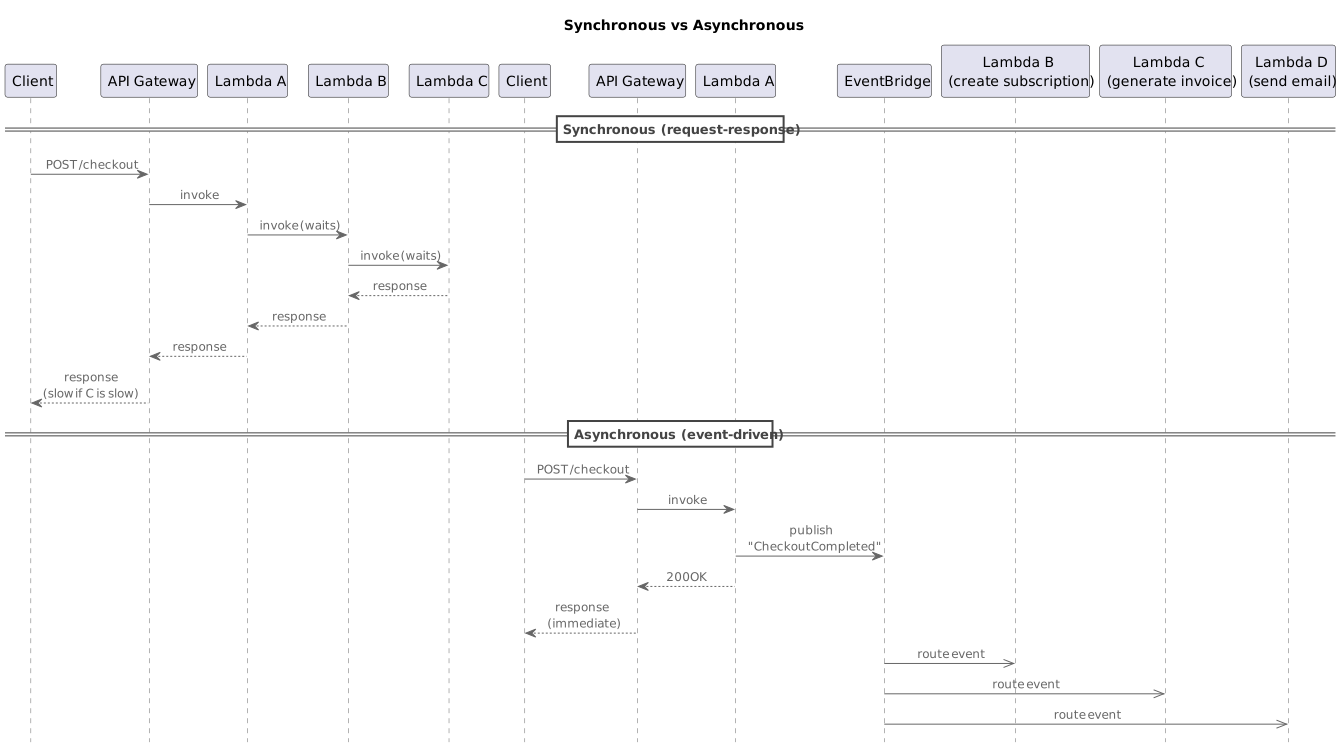
Lambda A responds immediately. B, C, D process independently. If one fails, the others still succeed.
EDA principles:
Principle |
What it means |
|---|---|
Loose coupling |
Services don’t know about each other, only about events |
Event naming |
Past tense: “WorkoutLogged”, “PRDetected”, “StreakUpdated” |
Idempotency |
Processing the same event twice produces the same result |
Error handling |
Dead Letter Queues (DLQ) for failed events, retries with backoff |
Schema validation |
Events have defined schemas, versioned for evolution |
When to use EDA:
Multiple services need to react to the same event
Processing can happen asynchronously (user doesn’t need to wait)
Services should be independently deployable and scalable
You want resilience — one service failure shouldn’t cascade
1.6 The arc42 Template
arc42 is a template for documenting software architecture. It has 12 chapters that cover everything from goals to risks:
Chapter |
What it covers |
Key question |
|---|---|---|
1. Introduction and Goals |
Business context, quality goals, stakeholders |
Why does this system exist? |
2. Constraints |
Technical, organizational, and convention constraints |
What are we not allowed to change? |
3. Context and Scope |
System boundary, external interfaces |
What’s inside vs outside the system? |
4. Solution Strategy |
Key technology decisions, top-level patterns |
How do we approach the problem? |
5. Building Block View |
Decomposition into components (C4 diagrams) |
What are the pieces and how do they fit? |
6. Runtime View |
Key scenarios as sequence diagrams |
How do the pieces interact at runtime? |
7. Deployment View |
Infrastructure, environments, deployment |
Where does it run? |
8. Cross-cutting Concepts |
Auth, error handling, logging, monitoring |
What patterns apply everywhere? |
9. Architecture Decisions |
ADRs — decisions with rationale |
Why did we choose X over Y? |
10. Quality Requirements |
Quality tree, quality scenarios |
How do we measure “good enough”? |
11. Risks and Technical Debts |
Known risks, mitigation strategies |
What could go wrong? |
12. Glossary |
Domain terms and definitions |
What do these words mean? |
Key principle: You don’t need to fill every chapter equally. Chapters 3 (Context), 5 (Building Blocks), and 9 (Decisions) are the most important. Chapters 10-12 can be brief for MVPs.
1.7 The C4 Model
The C4 model provides four levels of zoom for architecture diagrams:
Level 1: System Context  → Your system as a box, surrounded by users and external systems
Level 2: Container        → Zoom into the system: APIs, databases, frontends, message buses
Level 3: Component        → Zoom into a container: classes, modules, Lambda functions
Level 4: Code             → Zoom into a component: class diagrams (rarely needed)
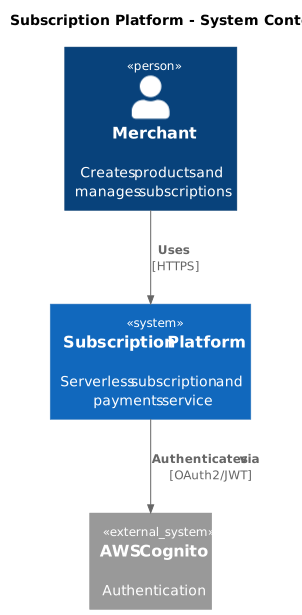
Level 1 — System Context:
Shows the big picture. Who uses the system? What external systems does it integrate with?
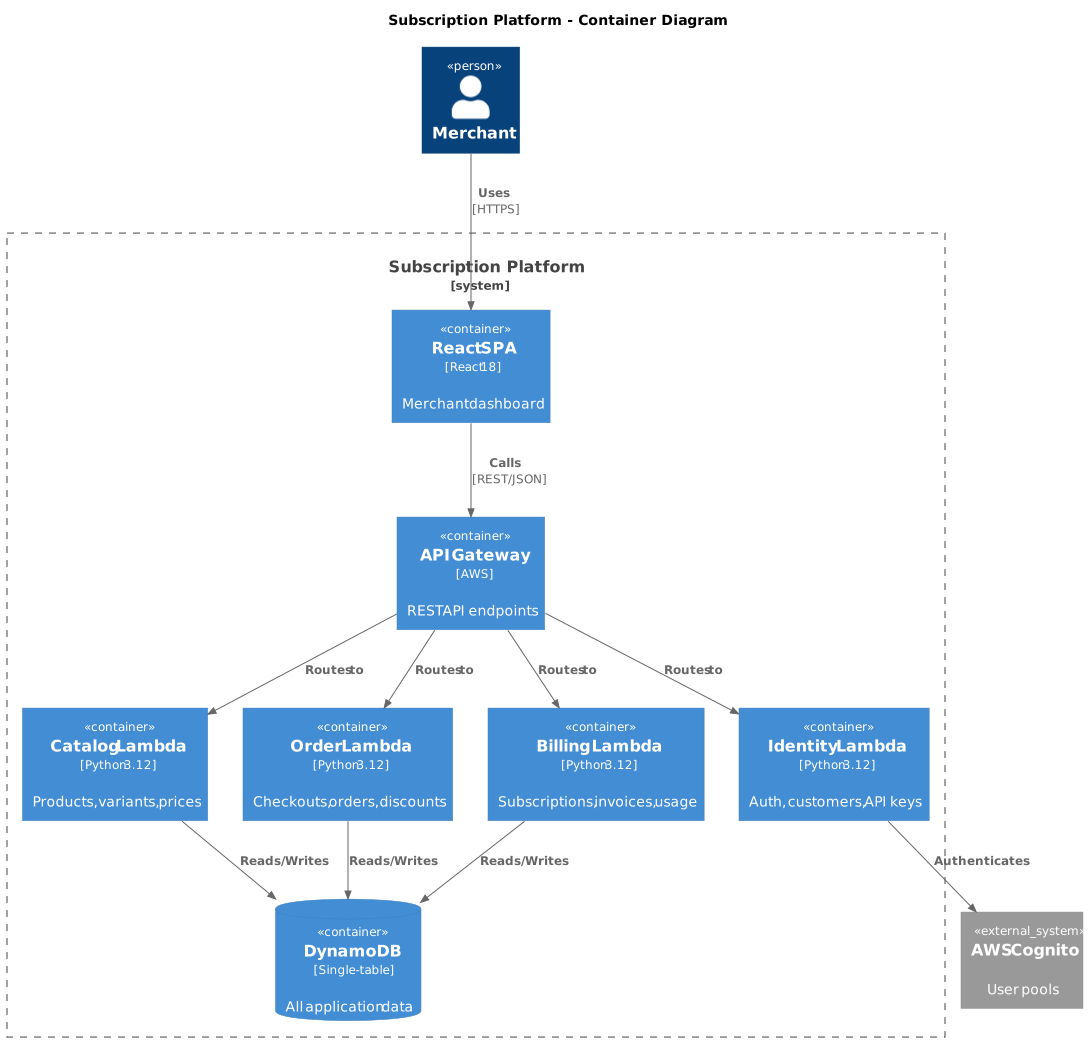
Level 2 — Container:
Shows the major technical building blocks. Each container is a separately deployable unit.
Level 3 — Component:
Shows the internal structure of a container. For serverless, this means individual Lambda functions and their responsibilities.
1.8 PlantUML: Diagrams as Code
PlantUML lets you write diagrams in a text format that compiles to images. This means diagrams are versioned in Git alongside your code.
C4 Context diagram in PlantUML (see diagrams/system-context.puml):
C4 Container diagram in PlantUML (see diagrams/container-diagram.puml):
Generating SVG from PlantUML:
# PlantUML is installed by ./setup.sh to:
# $HOME/.local/share/plantuml/plantuml.jar

# Generate SVG manually (if needed)
java -Dplantuml.allowincludeurl=true \
    -jar "$HOME/.local/share/plantuml/plantuml.jar" -tsvg diagram.puml

# Or use the online server for quick previews
# https://www.plantuml.com/plantuml/uml/
Diagrams are committed as .puml files. SVGs are generated and committed
alongside them.
Pre-commit hook for automatic SVG generation:
Since you’re working in your own repository for Modules 1–5, you need to set up the PlantUML hook there. Copy the hook script from the course repo (adjust the path to where you cloned it):
# From your kata repo root
COURSE_REPO="$HOME/SDP-Powered-by-AI-Agents-2026-04-06"
mkdir -p scripts/hooks
cp "$COURSE_REPO/scripts/hooks/validate-plantuml.sh" scripts/hooks/
chmod +x scripts/hooks/validate-plantuml.sh
Add this to your .pre-commit-config.yaml:
  - repo: local
    hooks:
      - id: plantuml-validation
        name: PlantUML Validation
        entry: bash scripts/hooks/validate-plantuml.sh
        language: system
        files: '\.puml$'
        pass_filenames: false
Run ./setup.sh from the course repo once to install PlantUML (it goes
to $HOME/.local/share/plantuml/ and is shared across all repos).
Now every time you commit a .puml file, the SVG is automatically
generated and staged alongside it.
1.9 Architecture Decision Records (ADRs)
An ADR documents a single architecture decision with its context and consequences. They live in the architecture document (arc42 Chapter 9).
ADR format:
## ADR-001: Use DynamoDB Single-Table Design

**Status:** Accepted

**Context:**
The Subscription Platform needs a database for merchants, products, orders, and subscriptions.
We need fast reads, low cost, and serverless scaling.

**Decision:**
Use Amazon DynamoDB with single-table design. All entities share one
table using composite keys (PK/SK).

**Rationale:**
- Scales to zero (on-demand billing)
- Single-digit millisecond latency
- No connection pooling needed (HTTP API)
- Single table reduces operational overhead
- Fits serverless model perfectly

**Consequences:**
- Access patterns must be designed upfront
- Queries are less flexible than SQL
- Team needs to learn DynamoDB data modeling
ADRs are valuable because they capture why a decision was made, not just what was decided. Six months later, when someone asks “why DynamoDB instead of PostgreSQL?”, the ADR has the answer.
2. Exercise Part 1: Understand arc42 and C4
Goal
Read and understand the arc42 template structure and C4 diagram levels, then choose a coding kata to architect.
Coding Kata
A kata is a small, well-defined programming exercise designed for deliberate practice. The term comes from martial arts — repeating a movement until it becomes second nature.
The Coding Dojo Kata Catalogue contains dozens of katas ranging from simple (FizzBuzz, StringCalculator) to complex (BankOCR, Minesweeper, GameOfLife). Each kata has a clear problem statement and constraints.
Choose one kata from https://codingdojo.org/kata/ that you will use for this module and the following modules. Pick one that is interesting to you and has enough complexity to produce a meaningful architecture (at least 2-3 bounded contexts or components).
Good choices for architecture practice:
BankOCR — parsing, validation, multiple processing stages
Minesweeper — grid logic, game state, rendering
Game of Life — simulation, state management, visualization
Bowling — scoring rules, frame management, game flow
Mars Rover — command parsing, movement, grid boundaries
Steps
Step 1: Study the arc42 Template
Read the arc42 template overview at https://arc42.org/overview.
For each of the 12 chapters, write one sentence describing what it covers.
Step 2: Study the C4 Model
Read the C4 model overview at https://c4model.com.
Sketch (on paper or whiteboard) a Level 1 and Level 2 diagram for your chosen kata.
Step 3: Set Up PlantUML Pre-commit Hook
Add the PlantUML SVG generation hook to your .pre-commit-config.yaml
and create the scripts/generate-plantuml.sh script as described in
section 1.8.
Test it by staging a .puml file and committing — the hook will
generate the SVG automatically.
Step 4: Write a PlantUML Diagram
Create a file architecture/diagrams/c4-context.puml with a C4 System Context
diagram for your chosen kata.
Commit the .puml file — the pre-commit hook should automatically
generate and stage the .svg:
git add architecture/diagrams/c4-context.puml
git commit -m "#<issue> docs(architecture): add C4 context diagram"
# Hook generates architecture/diagrams/c4-context.svg and stages it
Step 5: Write an ADR
Create architecture/09-architecture-decisions.md with ADR-001 documenting
the technology decisions for your kata (language, framework, data storage,
etc.). Follow the ADR format from section 1.9.
3. Exercise Part 2: Build and Use the Architecture Agent
Goal
Build a Kiro CLI agent that generates arc42 architecture documentation chapter by chapter, with PlantUML C4 diagrams. Use it to architect your chosen kata.
Step 1: Build the Architecture Agent
Create .kiro/agents/architecture-agent.json using the starter template
at starter/architecture-agent.json.
The agent must:
Generate arc42 chapters as separate
.mdfilesProduce PlantUML C4 diagrams (Context, Container, Component)
Work chapter by chapter, waiting for approval before proceeding
Include ADRs in Chapter 9
Step 2: Use the Agent to Design Your Kata Architecture
kiro-cli --tui --agent architecture-agent

> Design the architecture for [your kata name].
> [Describe the kata problem and your chosen tech stack]
> Start with Chapter 1.
Review each chapter before approving. The agent should produce:
architecture/
├── 01-introduction-and-goals.md
├── 02-constraints.md
├── 03-context-and-scope.md
├── 04-solution-strategy.md
├── 05-building-block-view.md
├── 06-runtime-view.md
├── 07-deployment-view.md
├── 08-cross-cutting-concepts.md
├── 09-architecture-decisions.md
├── 10-quality-requirements.md
├── 11-risks-and-technical-debts.md
├── 12-glossary.md
└── diagrams/
    ├── c4-context.puml
    ├── c4-container.puml
    └── c4-component-*.puml
Step 3: Verify Diagrams
Generate SVGs from all .puml files and verify they render correctly.
Fix any PlantUML syntax errors manually.
Step 4: Commit via Git Agent
Use your Git agent from Module 1:
kiro-cli --tui --agent git-agent

> Create a branch for the architecture issue
> Commit the architecture documents
> Create a PR closing the architecture issue
Step 5: Add Instructor as Reviewer and Merge
gh pr edit --add-reviewer momokrunic
Wait for approval, then merge:
gh pr merge --squash
Acceptance Criteria
Agent config exists at
.kiro/agents/architecture-agent.jsonAgent generates arc42 chapters as separate
.mdfilesAgent produces PlantUML C4 diagrams (Context, Container, Component)
Agent works chapter by chapter (waits for approval)
Agent includes ADRs in Chapter 9
Chosen kata architecture covers all 12 arc42 chapters
All PlantUML diagrams render correctly as SVG
Architecture committed and PR created via Git agent
Instructor added as reviewer on PR
References
Exercise Checklist
Module 2: Software Architecture — Exercise Checklist
Part 1: Understand arc42 and C4
Step 1: Study arc42
Read arc42 overview at https://arc42.org/overview
Write one sentence per chapter describing what it covers:
Ch 1: Introduction and Goals
Ch 2: Constraints
Ch 3: Context and Scope
Ch 4: Solution Strategy
Ch 5: Building Block View
Ch 6: Runtime View
Ch 7: Deployment View
Ch 8: Cross-cutting Concepts
Ch 9: Architecture Decisions
Ch 10: Quality Requirements
Ch 11: Risks and Technical Debts
Ch 12: Glossary
Step 2: Study C4
Read C4 model overview at https://c4model.com
Sketched Level 1 (System Context) diagram for chosen kata
Sketched Level 2 (Container) diagram for chosen kata
Step 3: Choose a Kata
Kata chosen from https://codingdojo.org/kata/
Kata name: ______________________________
Kata has enough complexity for 2–3 bounded contexts
Step 4: PlantUML Pre-commit Hook
PlantUML generation hook added to
.pre-commit-config.yamlscripts/generate-plantuml.shcreated (or setup.sh run)Tested: staged a
.pumlfile, committed, SVG auto-generated
Step 5: Write a PlantUML Diagram
architecture/diagrams/c4-context.pumlcreatedDiagram uses C4 PlantUML library (
C4_Context.puml)@startumldirective matches filename (c4-context)Committed — SVG auto-generated by pre-commit hook
Architecture markdown references the
.svgfile (not.puml)
Step 6: Write an ADR
architecture/09-architecture-decisions.mdcreatedADR-001 documents technology decisions (language, framework, data storage)
ADR follows format: Status, Context, Decision, Rationale, Consequences
Part 2: Build and Use the Architecture Agent
Agent:
architecture-agentkiro-cli --tui --agent architecture-agent
Step 1: Build the Architecture Agent
Agent config created at
.kiro/agents/architecture-agent.jsonAgent generates arc42 chapters as separate
.mdfilesAgent produces PlantUML C4 diagrams (Context, Container, Component)
Agent works chapter by chapter (waits for approval before next)
Agent includes ADRs in Chapter 9
Step 2: Generate Kata Architecture
Started agent:
kiro-cli --tui --agent architecture-agentDescribed kata problem and tech stack to agent
Chapters generated and approved one by one:
01-introduction-and-goals.md— approved02-constraints.md— approved03-context-and-scope.md— approved04-solution-strategy.md— approved05-building-block-view.md— approved06-runtime-view.md— approved07-deployment-view.md— approved08-cross-cutting-concepts.md— approved09-architecture-decisions.md— approved10-quality-requirements.md— approved11-risks-and-technical-debts.md— approved12-glossary.md— approved
Step 3: Verify Diagrams
All
.pumlfiles generate valid SVGsC4 Context diagram renders correctly
C4 Container diagram renders correctly
C4 Component diagram(s) render correctly
No PlantUML syntax errors
Markdown files reference
.svgfiles, NOT.puml— GitHub cannot render.pumlinline
⚠️ Common mistake:
will NOT display. Useinstead.
Step 4: Commit via Git Agent
Switch agent:
git-agentkiro-cli --tui --agent git-agent
Feature branch created for architecture issue
Architecture documents committed with issue reference
PR title must include
Module 2(e.g.#3 [FEAT] Module 2: Software architecture with arc42)PR created closing the architecture issue
Step 5: Review and Merge
Instructor added as reviewer (
gh pr edit --add-reviewer momokrunic)PR approved by instructor
Merged to main via
gh pr merge --squashArchitecture issue auto-closed