 SDP · AI Agents
Module 4: CI/CD
Table of Contents
Learning Objectives
By the end of this module you will:
Understand the difference between CI, CD, and continuous deployment
Know how GitHub Actions workflows, jobs, and steps work
Write a Dockerfile that builds and tests your kata
Design a pipeline that builds a Docker image and runs tests on GitHub Actions
Understand OIDC federation for keyless AWS deployments
Build a Kiro CLI agent that generates CI/CD pipelines for your kata
1. Theory: Continuous Integration and Continuous Delivery
1.1 Why CI/CD?
In Module 1 you learned Git branching and PRs. In Module 2 you designed
the architecture. In Module 3 you derived user stories. Now you need a
way to verify that every change works before it reaches main.
Without CI/CD:
Developer: "It works on my machine"
Reviewer: "Did you run the tests?"
Developer: "...most of them"
→ Broken main branch, manual testing, slow feedback
With CI/CD:
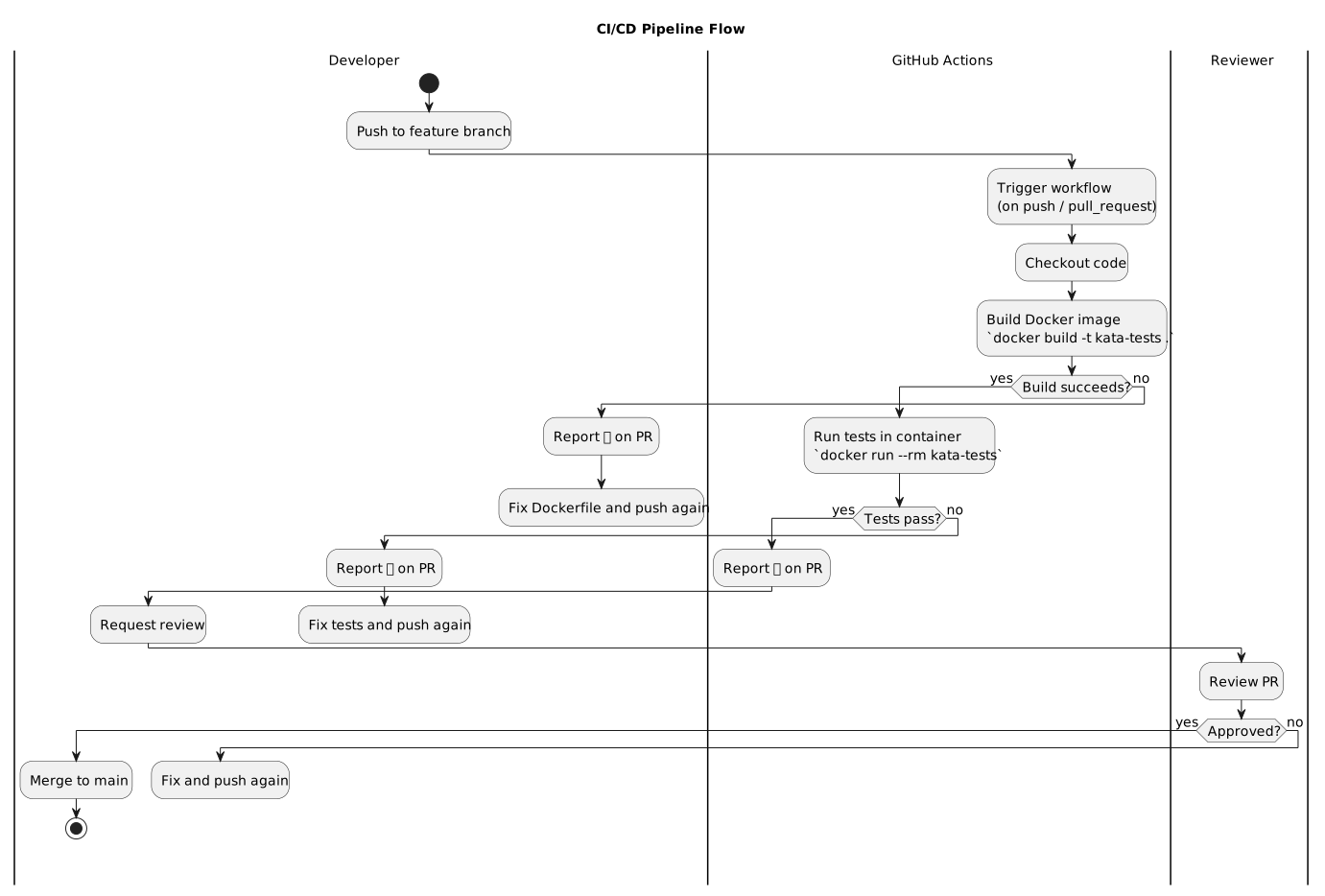
Developer pushes to feature branch
→ GitHub Actions builds Docker image
→ Tests run automatically inside the container
→ PR shows ✅ or ❌ before anyone reviews
→ Merge only when green
CI/CD is the ultimate harness sensor — it automatically validates every change against your test suite. No human has to remember to run tests. The pipeline does it for you, every time, consistently.
1.2 Continuous Integration
Continuous Integration means every developer integrates their work frequently — at least daily — and each integration is verified by an automated build and test run.
The CI contract:
Every push triggers a build
Every build runs the full test suite
A broken build is the team’s top priority to fix
The
mainbranch is always in a deployable state
Why “continuous”? Because the longer you wait to integrate, the
harder it gets. A feature branch that lives for two weeks accumulates
merge conflicts, diverges from main, and becomes a merge nightmare.
CI forces small, frequent integrations that are easy to verify.
At BMW, we had 160,000 CI jobs per day across the platform. That’s not overhead — that’s the safety net that let 2,000+ developers work on the same codebase without breaking each other’s work.
1.3 Continuous Delivery vs. Continuous Deployment
These terms are often confused:
Term |
Meaning |
|---|---|
Continuous Integration |
Every push is built and tested automatically |
Continuous Delivery |
Every green build could be deployed (manual trigger) |
Continuous Deployment |
Every green build is deployed automatically |
For this course, we practice Continuous Delivery — the pipeline builds, tests, and prepares a deployment, but a human (you or the instructor) decides when to deploy.
Push → Build → Test → [Deploy to Staging] → Manual approval → Deploy to Prod
       ^^^^^^^^^^^^                          ^^^^^^^^^^^^^^^^
       Continuous Integration                Continuous Delivery
1.4 GitHub Actions Fundamentals
GitHub Actions is a CI/CD platform built into GitHub. Workflows are
defined in YAML files under .github/workflows/.
Key concepts:
Concept |
Description |
|---|---|
Workflow |
A YAML file that defines the automation ( |
Event |
What triggers the workflow ( |
Job |
A set of steps that run on the same runner |
Step |
A single task — either a shell command ( |
Runner |
The machine that executes the job ( |
Action |
A reusable unit of code ( |
Anatomy of a workflow:
name: CI                          # Workflow name

on:                               # Trigger events
  push:
    branches: [main, 'feature/**']
  pull_request:
    branches: [main]

permissions:                      # Security: least privilege
  contents: read

jobs:                             # One or more jobs
  build-and-test:                 # Job ID
    runs-on: ubuntu-latest        # Runner
    steps:                        # Ordered list of steps
      - uses: actions/checkout@v4 # Step 1: checkout code
      - run: echo "Hello CI"      # Step 2: shell command
Trigger filtering with paths:
You can limit when a workflow runs based on which files changed:
on:
  push:
    paths:
      - 'src/**'
      - 'tests/**'
      - 'Dockerfile'
      - '.github/workflows/ci.yml'
This means the pipeline only runs when relevant code changes — not when you edit the README.
1.5 Docker in CI/CD
Docker solves the “works on my machine” problem. By building a Docker image, you guarantee that the CI environment is identical to the development environment.
Why Docker in CI?
Reproducibility — Same image, same results, everywhere
Isolation — Dependencies don’t leak between projects
Speed — Cached layers make rebuilds fast
Portability — The image runs on any Docker host
Dockerfile for a Python kata (example):
FROM python:3.12-slim

WORKDIR /app

# Install dependencies first (cached layer)
COPY requirements.txt .
RUN pip install --no-cache-dir -r requirements.txt

# Copy source code
COPY src/ src/
COPY tests/ tests/

# Run tests by default
CMD ["pytest", "tests/", "-v", "--tb=short"]
Dockerfile for a C++ kata (from the TDD course):
FROM ubuntu:latest

RUN apt-get update && \
    apt-get install -y --no-install-recommends \
    build-essential cmake git ca-certificates && \
    apt-get clean && rm -rf /var/lib/apt/lists/*

RUN git clone https://github.com/google/googletest.git && \
    cd googletest && mkdir build && cd build && \
    cmake .. && cmake --build . --target install

WORKDIR /app
COPY . .

RUN mkdir -p build && cd build && cmake .. && cmake --build .
CMD ["./build/run_tests"]
Key Dockerfile principles:
Order layers from least to most frequently changing
COPY requirements.txtbeforeCOPY src/to cache dependency installsUse
--no-cache-dirfor pip to keep the image smallUse multi-stage builds for compiled languages if the final image doesn’t need build tools
1.6 Pipeline Design: Build → Test → Deploy
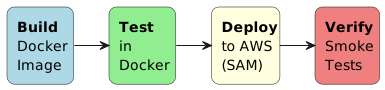
A well-designed pipeline has clear stages:
The full flow from push to merge:
For your kata, the pipeline should:
Build — Build the Docker image from your Dockerfile
Test — Run tests inside the Docker container
Report — Show test results in the PR
Example workflow for a kata:
name: CI

on:
  push:
    branches: [main, 'feature/**', 'fix/**']
  pull_request:
    branches: [main]

permissions:
  contents: read

jobs:
  build-and-test:
    runs-on: ubuntu-latest
    steps:
      - uses: actions/checkout@v4

      - name: Build Docker image
        run: docker build -t kata-tests .

      - name: Run tests
        run: docker run --rm kata-tests
That’s it. Three steps. The Dockerfile encapsulates all the build logic and dependencies. The workflow just builds and runs it.
1.7 OIDC Federation: No Secrets in the Repo
For the course project (Module 6), you’ll deploy to AWS. Instead of storing AWS access keys in GitHub Secrets (risky), we use OIDC federation — GitHub Actions proves its identity to AWS, and AWS grants temporary credentials.
permissions:
  id-token: write   # Required for OIDC
  contents: read

steps:
  - uses: aws-actions/configure-aws-credentials@v4
    with:
      role-to-assume: arn:aws:iam::954728790990:role/GitHubActions-Course
      aws-region: eu-central-1
How it works:
GitHub Actions requests an OIDC token from GitHub’s identity provider
The token is sent to AWS STS (Security Token Service)
AWS verifies the token and issues temporary credentials
The workflow uses those credentials — no long-lived keys anywhere
You don’t need OIDC for Module 4 (kata testing only), but understanding it prepares you for Module 6 deployment.
1.8 Pipeline as Code — The Harness Sensor
Remember from the intro: a harness has guides (feedforward) and sensors (feedback). Your CI/CD pipeline is the most powerful sensor in your development process.
Harness Component |
CI/CD Equivalent |
|---|---|
Guide (feedforward) |
Branch protection rules, required checks |
Sensor (feedback) |
Test results, build status, code coverage |
Actuator (action) |
Block merge on failure, auto-deploy on success |
Branch protection as a guide:
main branch rules:
  ✅ Require status checks to pass (CI must be green)
  ✅ Require PR reviews (at least 1 approval)
  ✅ No direct pushes to main
This means no code reaches main without passing the pipeline AND
getting a human review. The pipeline is the automated quality gate.
2. Exercise Part 1: Understand CI/CD Pipelines
Goal
Analyze the CI/CD concepts and manually write a Dockerfile and GitHub Actions workflow for your kata before automating it with an agent.
Step 1: Write a Dockerfile for Your Kata
Create a Dockerfile in your kata’s root directory that:
Starts from an appropriate base image for your kata’s language
Installs dependencies
Copies source code and tests
Runs tests as the default command
Test it locally:
docker build -t my-kata .
docker run --rm my-kata
Step 2: Write a GitHub Actions Workflow
⏳ Note: Steps 2 and 3 can only be fully verified after Module 5 (TDD/BDD), when you have actual implementation and test code that triggers the CI pipeline.
Create .github/workflows/ci.yml that:
Triggers on push to
mainandfeature/**branchesTriggers on pull requests to
mainBuilds the Docker image
Runs tests inside the container
Step 3: Verify the Pipeline
Push your changes to a feature branch and verify:
GitHub Actions workflow triggers
Docker image builds successfully
Tests run and results appear in the Actions tab
PR shows the check status (✅ or ❌)
3. Exercise Part 2: Build and Use the CI/CD Agent
Goal
Build a Kiro CLI agent that reads your kata’s project structure and generates a Dockerfile and GitHub Actions CI pipeline.
Step 1: Build the CI/CD Agent
Create .kiro/agents/cicd-agent.json using the starter template at
starter/cicd-agent.json.
The agent must:
Detect the kata’s language and build system
Generate a Dockerfile that builds and tests the kata
Generate a
.github/workflows/ci.ymlpipelineUse Docker to encapsulate the build environment
Follow GitHub Actions best practices (pinned action versions, least-privilege permissions)
Step 2: Use the Agent to Generate the Pipeline
kiro-cli --tui --agent cicd-agent

> Read my kata project structure
> Generate a Dockerfile for building and testing
> Generate a GitHub Actions CI workflow
Review each generated file before approving. The agent should produce:
Dockerfile                       ← Build + test container
.github/workflows/ci.yml        ← CI pipeline
Step 3: Test the Pipeline Locally
⏳ Note: Steps 3 and 4 can only be fully verified after Module 5 (TDD/BDD), when you have actual implementation and test code that triggers the CI pipeline.
Before pushing, verify the Docker build works:
docker build -t kata-tests .
docker run --rm kata-tests
Then configure the pre-commit hook so tests run automatically on every
commit. Copy scripts/hooks/docker-test.sh to your repo and add the
docker-test hook to your .pre-commit-config.yaml. Make a test commit
to verify the hook builds the image and runs tests before the commit
completes.
Step 4: Push and Verify on GitHub
Push to a feature branch and verify:
GitHub Actions workflow triggers automatically
Docker image builds successfully in the pipeline
Tests run and pass inside the container
PR shows ✅ status check
Step 5: Commit via Git Agent
kiro-cli --tui --agent git-agent

> Create a branch for the CI/CD issue
> Commit the Dockerfile and workflow
> Create a PR closing the CI/CD issue
Step 6: Add Instructor as Reviewer and Merge
gh pr edit --add-reviewer momokrunic
Wait for approval, then merge:
gh pr merge --squash
Acceptance Criteria
Agent config exists at
.kiro/agents/cicd-agent.jsonAgent detects kata language and build system
Agent generates a working Dockerfile
Agent generates
.github/workflows/ci.ymlDockerfile builds and runs tests successfully (local)
GitHub Actions pipeline triggers on push and PR
Tests run inside Docker container in the pipeline
PR shows ✅ status check from the CI workflow
Pipeline committed and PR created via Git agent
Instructor added as reviewer on PR
References
Exercise Checklist
Module 4: CI/CD — Exercise Checklist
Part 1: Understand CI/CD Pipelines
Step 1: Write a Dockerfile
Created
Dockerfilein kata rootBase image matches kata language
Dependencies installed before source copy (layer caching)
Source code and tests copied
Default CMD runs the test suite
Local build succeeds:
docker build -t my-kata .Local test run succeeds:
docker run --rm my-kata
Step 2: Write a GitHub Actions Workflow
⏳ Note: Steps 2 and 3 can only be fully verified after Module 5 (TDD/BDD), when you have actual implementation and test code that triggers the CI pipeline.
Created
.github/workflows/ci.ymlTriggers on push to
mainandfeature/**Triggers on pull_request to
mainPermissions set to
contents: readBuilds Docker image
Runs tests inside Docker container
Step 3: Verify the Pipeline
Pushed to feature branch
GitHub Actions workflow triggered
Docker image built successfully
Tests ran and results visible in Actions tab
PR shows ✅ or ❌ status check
Part 2: Build and Use the CI/CD Agent
Agent:
cicd-agentkiro-cli --tui --agent cicd-agent
Step 1: Build the CI/CD Agent
Agent config created at
.kiro/agents/cicd-agent.jsonAgent detects kata language and build system
Agent generates a working Dockerfile
Agent generates
.github/workflows/ci.ymlAgent uses pinned action versions
Agent sets minimal permissions
Agent uses path filtering
Step 2: Generate Pipeline Files
Started agent:
kiro-cli --tui --agent cicd-agentAgent read project structure
Dockerfile generated and approved
CI workflow generated and approved
Step 3: Test Locally
⏳ Note: Steps 3 and 4 can only be fully verified after Module 5 (TDD/BDD), when you have actual implementation and test code that triggers the CI pipeline.
docker build -t kata-tests .succeedsdocker run --rm kata-testsruns tests and passesCopied
scripts/hooks/docker-test.shto your repo and added thedocker-testhook to.pre-commit-config.yamlMade a test commit — pre-commit hook builds image and runs tests automatically
Step 4: Push and Verify
Pushed to feature branch
GitHub Actions triggered
Docker build succeeded in pipeline
Tests passed inside container
PR shows ✅ status check
Step 5: Commit via Git Agent
Switch agent:
git-agentkiro-cli --tui --agent git-agent
Feature branch created for CI/CD issue
Dockerfile and workflow committed with issue reference
PR title must include
Module 4(e.g.#5 [FEAT] Module 4: CI/CD pipeline with Docker)PR created closing the CI/CD issue
Step 6: Review and Merge
Instructor added as reviewer (
gh pr edit --add-reviewer momokrunic)PR approved by instructor
Merged to main via
gh pr merge --squashCI/CD issue auto-closed