 SDP · AI Agents
Module 5: TDD/BDD
Table of Contents
Learning Objectives
By the end of this module you will:
Understand the Red-Green-Refactor cycle and why tests come first
Know the difference between TDD (bottom-up) and BDD (top-down)
Write testable acceptance criteria using GIVEN-WHEN-THEN
Apply Green Bar patterns: Fake It, Triangulate, Obvious Implementation
Know when and how to refactor safely
Build a Kiro CLI agent that implements your kata using strict TDD discipline
1. Theory: Test-Driven Development
1.1 Why TDD?
TDD was invented in the punch card era of the 1950s. Computer time was scarce and expensive — you might wait days for your 30-minute slot. So engineers developed a discipline: specify the expected output first (punch an output card), then write the program (punch input cards), then verify (compare cards).
They were doing Test-Driven Development before the term existed. The constraint of expensive feedback forced them to think before coding.
Today we have instant feedback, but many developers have lost that discipline. TDD brings it back — not because computer time is scarce, but because good design thinking is scarce.
At one large European OEM, with 500 million lines of code and 160,000 CI jobs per day, TDD was the only way 2,000+ developers could work on the same codebase without breaking each other’s work. At another automotive platform project, teams that adopted TDD delivered 40% faster with 35% fewer defects.
1.2 The Red-Green-Refactor Cycle
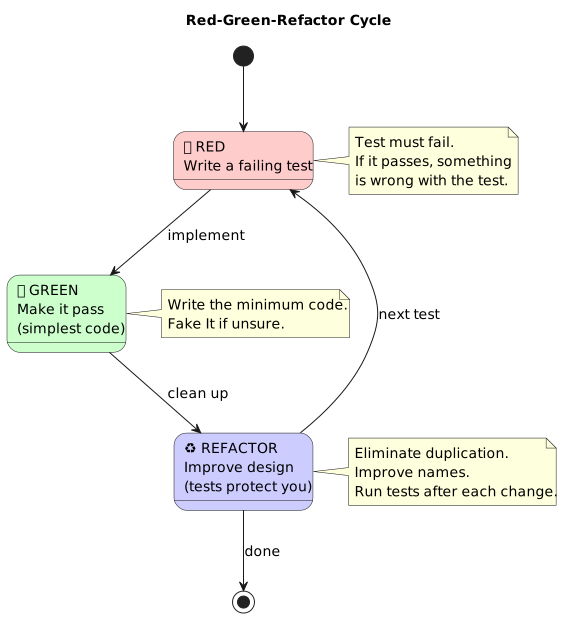
The heartbeat of TDD:
🔴 RED     → Write a failing test
✅ GREEN   → Write just enough code to make it pass
♻️ REFACTOR → Improve the code while tests protect you
Rules:
Write one test. Run it. It must fail (RED).
Write the simplest code that makes the test pass (GREEN).
Look for refactoring opportunities. Clean up. Run tests again.
Repeat.
You write one test at a time. You do not move to the next test until you are satisfied with how your code looks.
1.3 TDD Is a Design Technique
TDD is not primarily a testing technique — it’s a design technique. The tests are valuable, but the real value is in the thinking process TDD forces you through.
When you write the test first:
You think about behavior before implementation
You consider the interface before the internals
You identify dependencies before they become entangled
You design for testability, which means designing for modularity
A senior developer told me: “I used to think TDD was about catching bugs. Now I realize it’s about not creating bugs in the first place by forcing better design.”
1.4 Behavior-Driven Development (BDD)
BDD is the top-down complement to TDD’s bottom-up approach. While TDD starts with unit tests and builds upward, BDD starts with user behavior and works downward.
BDD uses the GIVEN-WHEN-THEN format from Module 3:
GIVEN the account balance is €100
WHEN the customer withdraws €30
THEN the balance should be €70
This maps directly to test code:
def test_withdrawal_reduces_balance():
    # GIVEN
    account = Account(balance=100)

    # WHEN
    account.withdraw(30)

    # THEN
    assert account.balance == 70
BDD key principles:
Test method names should be sentences describing behavior
Ask: “What’s the next most important thing the system doesn’t do?”
Requirements are behavior — acceptance criteria are scenarios
Scenarios become executable specifications
1.5 Properties of Good Tests
Property |
Meaning |
|---|---|
Understandable |
Anyone can read the test and know what it verifies |
Maintainable |
Changing implementation doesn’t break unrelated tests |
Repeatable |
Same result every time, no external dependencies |
Necessary |
Every test verifies a distinct behavior |
Granular |
One test = one behavior = one reason to fail |
Fast |
The full suite runs in seconds, not minutes |
Isolated tests: Tests should not affect one another. One broken test should expose one problem. Tests must be order-independent.
Three types of tests in TDD:
Test a return value or exception
Test a change in state
Test an interaction (mock/spy)
1.6 Green Bar Patterns
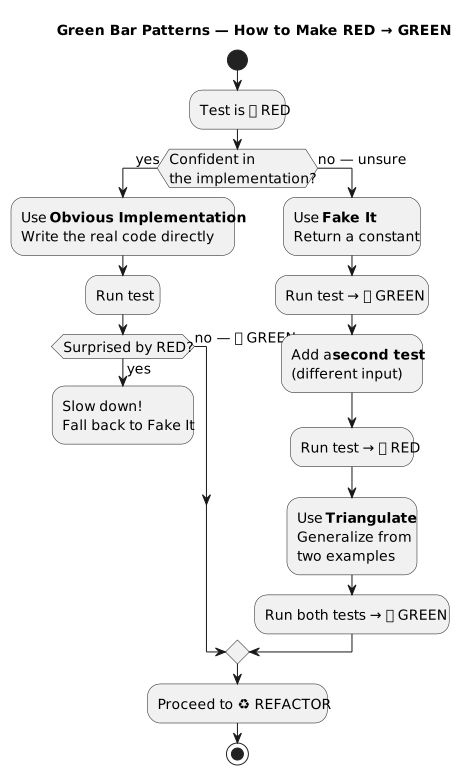
When the test is RED, use these patterns to make it GREEN:
Fake It (‘Til You Make It) — Return a constant. Having something running is better than not having something running. The duplication between test and fake implementation drives abstraction.
def calculate_tax(amount):
    return 10  # Fake it — we know the test expects 10
Triangulate — Abstract only when you have two or more examples. Use triangulation when you’re unsure about the correct abstraction.
# Test 1: calculate_tax(100) == 10
# Test 2: calculate_tax(200) == 20
# Now you MUST generalize: return amount * 0.10
Obvious Implementation — When you’re sure you know how to implement it, go ahead. But if you’re surprised by red bars, fall back to Fake It. Keep track of how often you’re surprised — that tells you when to slow down.
1.7 Refactoring: The Third Step
Refactoring means changing software to improve its internal structure while preserving its behavior.
When to refactor:
Only during the GREEN stage — never refactor on RED
When it becomes hard to write the next test
When resolving technical debt
When code readability can be improved
Principles:
Refactor in small steps
Run tests frequently — they’re your safety net
Eliminate duplicated code
Use meaningful variable names
Apply the Two Hats rule: one hat for adding functionality, one hat for improving design — never both at the same time
When NOT to refactor:
The code doesn’t work (fix it first)
It’s cheaper to rewrite from scratch
You’re close to a deadline (note the tech debt, move on)
1.8 Implementation Order: INFRA → BE → FE → E2E
From Module 3, your stories are decomposed into sub-stories. The implementation order matters:
1. INFRA stories → Deploy infrastructure (Docker, configs)
2. BE stories    → Implement business logic, API endpoints
3. FE stories    → Build UI components (if applicable)
4. E2E tests     → Verify the full flow works end-to-end
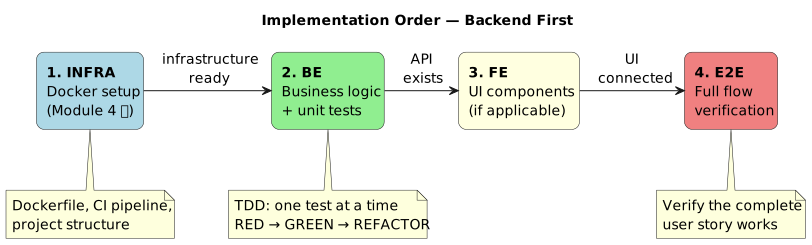
You can’t build a UI for an API that doesn’t exist. You can’t deploy code without infrastructure. Follow the order.
For your kata, INFRA means your Docker setup (from Module 4). BE means your core logic and tests. FE and E2E may not apply depending on your kata.
1.9 One Test at a Time
This is the most important rule and the hardest to follow:
Write only ONE test at a time. Implement only ONE test at a time.
Do not write three tests and then implement all three. Do not write a test and then implement more than what’s needed to pass it.
The cycle is:
Pick the next scenario from your user story
Write ONE test for that scenario
Run it — confirm RED
Write just enough code to make it GREEN
Run ALL tests — confirm no regressions
Refactor if needed
Commit (test is GREEN = safe to commit)
Move to the next scenario
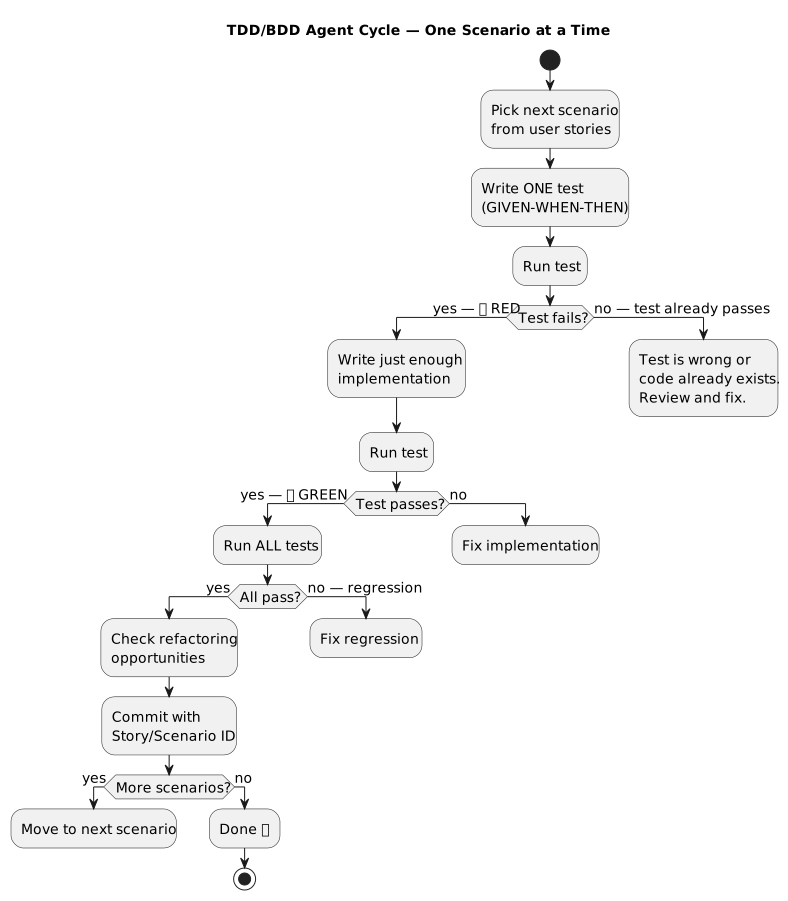
Once a test is GREEN, commit. Your Git history should show the RED-GREEN-REFACTOR rhythm clearly.
2. Prerequisite: Fix Requirements and INFRA Stories
Before implementing with TDD, you need to update your Module 3 output:
Step 1: Update Requirements Agent
Your requirements agent (Module 3) generated INFRA stories that assumed AWS deployment. Since your kata runs locally in Docker (Module 4), you need to update the agent to generate Docker-based INFRA stories instead.
Update your requirements-agent.json to force local deployment:
INFRA stories should reference Docker containers, not Lambda/DynamoDB
The deployment target is
docker build+docker run, not SAM/CloudFormationTest execution happens inside Docker via
pytest
Step 2: Regenerate INFRA Stories
Use your updated requirements agent to regenerate the INFRA sub-stories for your kata. The new INFRA stories should cover:
Dockerfile builds successfully
Test suite runs inside Docker container
Dependencies are installed correctly
Project structure supports pytest discovery
Step 3: Verify INFRA Stories Pass
Your Module 4 pipeline should already satisfy these INFRA stories. Run your CI pipeline to confirm:
docker build -t kata-tests .
docker run --rm kata-tests
If this passes, your INFRA stories are GREEN and you can move to BE stories.
3. Exercise Part 1: Manual TDD Cycle
Goal
Practice the RED-GREEN-REFACTOR cycle manually on one BE scenario from your kata before automating it with an agent.
Step 1: Pick a Scenario
Choose one BE scenario from your user stories (Module 3). It should be simple enough to implement in one sitting.
Step 2: Write the Test (RED)
Write a single test for that scenario using pytest and GIVEN-WHEN-THEN:
def test_scenario_name():
    # GIVEN
    # ... setup

    # WHEN
    # ... action

    # THEN
    assert ...  # expected outcome
Run it. Confirm it fails.
Step 3: Make It Pass (GREEN)
Write the simplest code that makes the test pass. Don’t over-engineer. Fake It if needed.
Run the test. Confirm it passes. Run ALL tests. Confirm no regressions.
Step 4: Refactor
Look at your code. Can you improve naming? Remove duplication? Simplify?
Make changes. Run tests after each change.
Step 5: Commit
git add .
git commit -m "#<issue> feat(<scope>): implement <scenario description>"
4. Exercise Part 2: Build and Use the TDD/BDD Agent
Goal
Build a Kiro CLI agent that implements your kata using strict TDD discipline — one test at a time, RED-GREEN-REFACTOR, commit on GREEN.
This is the most complex agent in the course. Use the Kiro CLI agent creation guide and configuration reference to build it.
Step 1: Build the TDD/BDD Agent
Create .kiro/agents/tdd-bdd-agent.json using the starter template at
starter/tdd-bdd-agent.json.
The agent must follow this strict cycle for each scenario:
Write the test for the selected user story scenario
Execute to confirm it is RED
Write just enough implementation to make the test pass
Execute the test to confirm it is GREEN
Execute all tests to confirm no regressions
Check for refactoring opportunities to improve code quality while preserving behavior
Commit (test is GREEN = safe to commit)
Move to next scenario
Critical rules:
Write only ONE test at a time
Implement only ONE test at a time
Execution order: INFRA → BE → FE → E2E
Once a test is GREEN, commit immediately
Use GIVEN-WHEN-THEN comments in every test
Reference the Story ID and Scenario ID in test names
Step 2: Configure the Agent
The TDD/BDD agent needs more capabilities than previous agents. Use the configuration reference to configure:
tools—read,write,shell(for running tests)allowedTools—read(auto-approve reads for speed)resources— load your user stories fromdocs/user-stories/hooks— considerpostToolUsehooks to auto-run tests after writes
Example resource configuration:
{
  "resources": [
    "file://docs/user-stories/**/*.md"
  ]
}
Example hook to run tests after every file write:
{
  "hooks": {
    "postToolUse": [
      {
        "matcher": "fs_write",
        "command": "docker run --rm -v $(pwd):/app -w /app kata-tests pytest tests/ -v --tb=short 2>&1 | tail -20"
      }
    ]
  }
}
Step 3: Use the Agent
kiro-cli --agent tdd-bdd-agent

> Read my user stories at docs/user-stories/
> Start with the first BE scenario of the first core story
> Follow strict RED-GREEN-REFACTOR — one test at a time
The agent should:
Read the scenario from your user stories
Write ONE test → run it → confirm RED
Write implementation → run it → confirm GREEN
Run ALL tests → confirm no regressions
Suggest refactoring if needed
Commit with story/scenario reference
Ask which scenario to do next
The Full Multi-Agent Workflow
In practice, you orchestrate the Git agent and TDD/BDD agent together. This is the workflow you should follow for each user story:
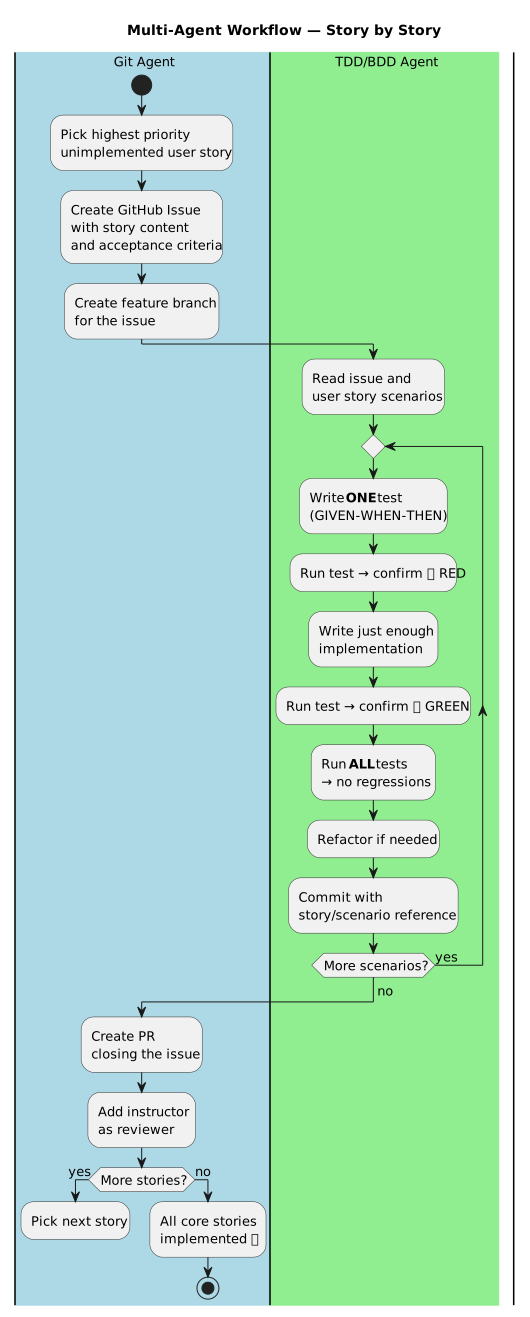
Example session:
# 1. Git agent — create issue and branch
kiro-cli --agent git-agent
> Take the highest priority unimplemented user story from docs/user-stories/
> Create a GitHub issue with the story content and acceptance criteria
> Create a feature branch for the issue

# 2. TDD/BDD agent — implement
kiro-cli --agent tdd-bdd-agent
> Implement GitHub issue #<N>
> Follow strict RED-GREEN-REFACTOR — one test at a time

# 3. Git agent — PR
kiro-cli --agent git-agent
> Create a PR closing issue #<N>
> Add momokrunic as reviewer

# 4. Repeat with next story
This loop continues until all core (Pareto 20%) stories are implemented.
Step 4: Verify TDD Discipline in Git History
Your Git log should show the RED-GREEN-REFACTOR rhythm:
git log --oneline
# Each commit should be a GREEN test
# No commits with failing tests
Step 5: Commit via Git Agent
kiro-cli --agent git-agent

> Create a branch for the TDD implementation issue
> Create a PR closing the issue
Step 6: Add Instructor as Reviewer and Merge
gh pr edit --add-reviewer momokrunic
Wait for approval, then merge:
gh pr merge --squash
Acceptance Criteria
Requirements agent updated to generate Docker-based INFRA stories
INFRA stories pass (Docker build + test run)
Agent config exists at
.kiro/agents/tdd-bdd-agent.jsonAgent reads user stories and follows INFRA → BE → FE → E2E order
Agent writes ONE test at a time
Agent confirms RED before implementing
Agent confirms GREEN after implementing
Agent runs ALL tests to check for regressions
Agent suggests refactoring opportunities
Agent commits on GREEN with story/scenario reference
Git history shows RED-GREEN-REFACTOR rhythm
PR created via Git agent with instructor as reviewer
References
Exercise Checklist
Module 5: TDD/BDD — Exercise Checklist
Prerequisite: Fix Requirements and INFRA Stories
Step 1: Update Requirements Agent
Updated
requirements-agent.jsonto generate Docker-based INFRA storiesINFRA stories reference Docker containers (not Lambda/DynamoDB)
Deployment target is
docker build+docker run
Step 2: Regenerate INFRA Stories
Regenerated INFRA sub-stories with updated requirements agent
INFRA stories cover: Dockerfile builds, tests run in Docker, dependencies installed
Step 3: Verify INFRA Stories Pass
docker build -t kata-tests .succeedsdocker run --rm kata-testsruns testsCI pipeline from Module 4 is GREEN
Part 1: Manual TDD Cycle
Step 1: Pick a Scenario
Selected one BE scenario from user stories
Scenario is simple enough for one sitting
Step 2: Write the Test (RED)
Written ONE test with GIVEN-WHEN-THEN comments
Test references Story ID and Scenario ID
Ran test locally — observed RED (failing). Do NOT commit on RED.
Step 3: Make It Pass (GREEN)
Written simplest code to make test pass
Ran test — confirmed GREEN (passing)
Ran ALL tests — confirmed no regressions
Step 4: Refactor
Checked for duplicated code
Improved naming if needed
Ran ALL tests after refactoring
Step 5: Commit (only on GREEN!)
Committed with story/scenario reference in message
Part 2: Build and Use the TDD/BDD Agent
Step 1: Build the TDD/BDD Agent
Copied
tdd-bdd-agent.jsonandtdd-bdd-prompt.mdto.kiro/agents/Completed TODO: Test Naming Convention
Completed TODO: GIVEN-WHEN-THEN Test Template
Completed TODO: Green Bar Pattern Rules
Completed TODO: Refactoring Checklist
Completed TODO: Commit Message Format
Completed TODO: postToolUse Hook (runs pytest after writes)
Step 2: Multi-Agent Workflow (at least one complete story)
Pick one user story and follow this loop:
Switch agent:
git-agentkiro-cli --agent git-agent
Git agent: took highest priority unimplemented story
Git agent: created GitHub issue with story content and acceptance criteria
Git agent: created feature branch for the issue
Switch agent:
tdd-bdd-agentkiro-cli --agent tdd-bdd-agent
TDD/BDD agent: read the issue and user story scenarios
TDD/BDD agent: followed INFRA → BE → FE → E2E order
For each scenario in the story:
Wrote ONE test → ran locally → observed RED (failing)
Wrote implementation → ran → confirmed GREEN (passing)
Ran ALL tests → no regressions
Checked for refactoring opportunities
Committed on GREEN with story/scenario reference (only commit on GREEN!)
Switch agent:
git-agentkiro-cli --agent git-agent
Git agent: created PR closing the issue
Git agent: PR title must include
Module 5(e.g.#7 [FEAT] Module 5: TDD/BDD multi-agent implementation)Git agent: added instructor as reviewer (
gh pr edit --add-reviewer momokrunic)
♻️ Optional: Repeat with more stories for extra practice.
Step 3: Verify TDD Discipline
At least one complete story implemented through multi-agent workflow
Git log shows one commit per GREEN test (each commit = one scenario passing)
All commits have passing tests (no RED commits in history)
Test names include Story/Scenario IDs
All tests have GIVEN-WHEN-THEN comments
Step 4: Review and Merge
PR approved by instructor
Merged to main via
gh pr merge --squashIssue auto-closed