 SDP · AI Agents
Module 3: Software Requirements
Table of Contents
Learning Objectives
By the end of this module you will:
Understand how to derive user stories from architecture documents
Write testable acceptance criteria using GIVEN-WHEN-THEN format
Decompose stories into Frontend, Backend, and Infrastructure sub-stories
Apply the Pareto principle to prioritize high-impact stories
Maintain full traceability from architecture → story → scenario → test
Build a Kiro CLI agent that automates story derivation
1. Theory: From Architecture to User Stories
1.1 Why Requirements Engineering?
In Module 2 you designed the architecture — the what and how of your system. Now you need to define the what to build first and how to verify it works.
Without structured requirements:
Developer: "I'll build the login page"
PM: "But we need the payment flow first"
Tester: "How do I know if login works correctly?"
→ Misaligned priorities, untestable features, wasted effort
With user stories and acceptance criteria:
STORY: AS A customer I WANT to checkout SO THAT I can purchase items
GIVEN items in cart WHEN I click checkout THEN order is created
→ Clear priority, testable, everyone aligned
1.2 User Stories
A user story captures a requirement from the user’s perspective:
AS A <role>
I WANT <feature>
SO THAT <benefit>
Good stories are INVEST:
Property |
Meaning |
Example |
|---|---|---|
Independent |
Can be developed in any order |
Login doesn’t depend on dashboard |
Negotiable |
Details can be discussed |
“Fast” → “< 200ms response” |
Valuable |
Delivers value to the user |
Not “create database table” |
Estimable |
Team can estimate effort |
Clear enough to size |
Small |
Fits in one sprint/iteration |
Not “build the entire app” |
Testable |
Has clear acceptance criteria |
GIVEN-WHEN-THEN scenarios |
Bad story:
AS A user I WANT the system to work SO THAT I can use it
Good story:
AS A customer I WANT to search products by name
SO THAT I can find what I'm looking for quickly
1.3 Domain-Driven Design and Bounded Contexts
Your architecture document (Module 2) identified bounded contexts — these become the domains for your user stories.
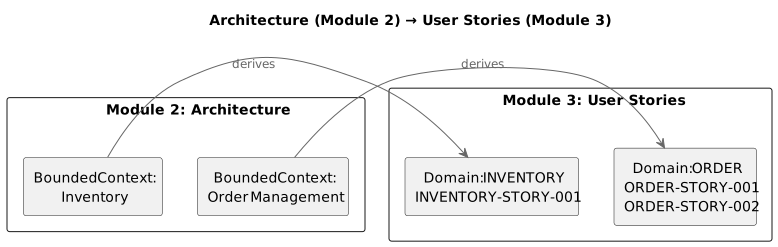
Each bounded context from your architecture maps to a domain in your story IDs. This maintains traceability from architecture to requirements.
1.4 Acceptance Criteria with GIVEN-WHEN-THEN
Every story needs testable scenarios using the GIVEN-WHEN-THEN format:
### SCENARIO 1: Successful product search

**GIVEN**
* Product catalogue contains "Red Widget" and "Blue Widget"
* I am on the search page

**WHEN**
* I type "Widget" in the search box
* I click "Search"

**THEN**
* Results show "Red Widget" and "Blue Widget"
* Results count shows "2 products found"
* Each result shows name, price, and thumbnail
Why GIVEN-WHEN-THEN?
GIVEN = test setup (preconditions)
WHEN = action under test (trigger)
THEN = assertions (expected outcome)
This maps directly to test code:
def test_product_search_returns_matching_items():
    # GIVEN
    catalogue = create_catalogue(["Red Widget", "Blue Widget", "Green Gadget"])

    # WHEN
    results = search(catalogue, query="Widget")

    # THEN
    assert len(results) == 2
    assert results[0].name == "Red Widget"
    assert results[1].name == "Blue Widget"
1.5 Story Decomposition: Original → FE + BE + INFRA
A single user story is too big to implement directly. We decompose it into sub-stories by layer:
STORY: AS A customer I WANT to search products

├── FE STORY 1.1: Search input component
├── FE STORY 1.2: Results list component
├── BE STORY 1.1: Search API endpoint
├── BE STORY 1.2: Search indexing logic
├── INFRA STORY 1.1: Deploy search service (Docker/Lambda/package)
├── INFRA STORY 1.2: Create data store (DB table, file storage, etc.)
├── INFRA STORY 1.3: Configure event handling (if applicable)
└── INFRA STORY 1.4: Setup monitoring and observability
Why decompose?
Each sub-story is independently testable
Implementation order is clear: INFRA → BE → FE
Progress is trackable at a granular level
Different developers can work in parallel
Implementation order matters:
1. INFRA stories first  → Deploy service, create data store, configure events
2. BE stories next      → Implement business logic, API endpoints
3. FE stories last      → Build UI components that call the API
4. Original story E2E   → Verify the full flow works end-to-end
This is the backend-first mandate — you can’t build a UI for an API that doesn’t exist, and you can’t deploy code without infrastructure.
1.6 Pareto Prioritization (80/20 Rule)
The Pareto principle states that 20% of stories deliver 80% of the value. Your job is to identify which stories are in that critical 20%.
All Stories (100%)
├── Core Stories (20%) → 80% of value
│   ├── STORY-001: User authentication     ← Must have
│   ├── STORY-002: Product search          ← Must have
│   └── STORY-003: Checkout flow           ← Must have
│
└── Supporting Stories (80%) → 20% of value
    ├── STORY-004: Wishlist                ← Nice to have
    ├── STORY-005: Review system           ← Nice to have
    ├── STORY-006: Recommendation engine   ← Nice to have
    └── ...
How to identify core stories:
Which stories are needed for the MVP?
Which stories block other stories?
Which stories deliver the most user value?
Which stories exercise the most architecture components?
1.7 Story ID Format and Traceability
Every story and scenario gets a unique ID for traceability:
Type |
Format |
Example |
|---|---|---|
Original story |
|
|
Frontend |
|
|
Backend |
|
|
Infrastructure |
|
|
Scenario |
|
|
Traceability chain:
Architecture Section 3.2  →  ORDER-STORY-001  →  ORDER-BE-001.1  →  ORDER-BE-001.1-S1
     (design)                  (requirement)       (sub-story)         (test scenario)
This means you can trace any test back to the architecture decision that motivated it. When a test fails, you know exactly which requirement and which architecture component is affected.
1.8 Progress Tracking
Track story completion with Pareto metrics:
📊 Pareto Progress: 2/3 core stories (67% of 20% core stories)
🎯 Core functionality coverage: ~53% of 80% target
All stories go in docs/user-stories/ organized by domain:
docs/user-stories/
├── README.md                    ← Story inventory + progress
├── order-management.md          ← ORDER-STORY-001 + all sub-stories
├── inventory.md                 ← INVENTORY-STORY-001 + all sub-stories
└── user-authentication.md       ← AUTH-STORY-001 + all sub-stories
Each file is a story bundle — the original story plus all its FE, BE, and INFRA sub-stories in one file.
2. Exercise Part 1: Understand Story Decomposition
Goal
Analyze your kata architecture (from Module 2) and manually write one complete story bundle to understand the pattern before automating it.
Steps
Step 1: Identify Domains
Read your architecture document from Module 2. List the bounded contexts or major components — these become your story domains.
Step 2: List All Stories
Write a prioritized list of all user stories for your kata. Mark the Pareto 20% (core stories that deliver 80% of value).
Step 3: Write One Story Bundle Manually
Pick one core story and write the complete bundle:
Original story with GIVEN-WHEN-THEN scenarios
FE sub-stories (if applicable) with scenarios
BE sub-stories with scenarios
INFRA sub-stories with scenarios
Use the Story ID format from section 1.7.
Step 4: Verify Traceability
For each scenario, verify you can trace it back to:
A specific architecture section (Chapter reference)
A parent story (Story ID)
A testable assertion (THEN clause)
3. Exercise Part 2: Build and Use the Requirements Agent
Goal
Build a Kiro CLI agent that reads your architecture document and derives user stories with full decomposition and Pareto prioritization.
Step 1: Build the Requirements Agent
Create .kiro/agents/requirements-agent.json using the starter template
at starter/requirements-agent.json.
The agent must:
Read the architecture document and extract domains/bounded contexts
Generate a prioritized story list with Pareto analysis
Write story bundles (Original + FE + BE + INFRA) one at a time
Use GIVEN-WHEN-THEN format for all scenarios
Include architecture references for traceability
Wait for approval before proceeding to the next story
Track progress with Pareto metrics
Step 2: Use the Agent to Derive Stories
kiro-cli --tui --agent requirements-agent

> Read my architecture at architecture/
> List all user stories with Pareto prioritization
> Start with the first core story
Review each story bundle before approving. The agent should produce:
docs/user-stories/
├── README.md                    ← Story inventory + Pareto progress
├── {domain-1}.md                ← STORY-001 + FE + BE + INFRA
├── {domain-2}.md                ← STORY-002 + FE + BE + INFRA
└── {domain-3}.md                ← STORY-003 + FE + BE + INFRA
Step 3: Verify Story Quality
For each story bundle, check:
Original story has clear AS A / I WANT / SO THAT
All scenarios use GIVEN-WHEN-THEN format
Architecture references point to real sections
Story IDs follow the naming convention
INFRA stories cover: deployment, data store, events, monitoring (adapted to your architecture)
Pareto progress is tracked in README.md
Step 4: Commit via Git Agent
kiro-cli --tui --agent git-agent

> Create a branch for the requirements issue
> Commit the user stories
> Create a PR closing the requirements issue
Step 5: Add Instructor as Reviewer and Merge
gh pr edit --add-reviewer momokrunic
Wait for approval, then merge:
gh pr merge --squash
Acceptance Criteria
Agent config exists at
.kiro/agents/requirements-agent.jsonAgent reads architecture and extracts domains
Agent generates prioritized story list with Pareto analysis
Agent writes story bundles with Original + FE + BE + INFRA
All scenarios use GIVEN-WHEN-THEN format
Story IDs follow
{DOMAIN}-{TYPE}-{N}.{X}conventionArchitecture references link to real sections
INFRA stories cover deployment, data store, events, monitoring (adapted to your architecture)
Progress tracked in
docs/user-stories/README.mdStories committed and PR created via Git agent
Instructor added as reviewer on PR
References
Exercise Checklist
Module 3: Software Requirements — Exercise Checklist
Part 1: Understand Story Decomposition
Step 1: Identify Domains
Read architecture document from Module 2
Listed bounded contexts / major components
Mapped each context to a story domain name
Step 2: List All Stories
Written prioritized list of all user stories
Marked Pareto 20% (core stories)
Total stories: ______
Core stories (20%): ______
Step 3: Write One Story Bundle Manually
Picked one core story
Written Original story with AS A / I WANT / SO THAT
Written GIVEN-WHEN-THEN scenarios for original story
Written FE sub-stories with scenarios (if applicable)
Written BE sub-stories with scenarios
Written INFRA sub-stories with scenarios:
INFRA: Deployment (Docker container, CI pipeline, or packaging)
INFRA: Data store (database, file storage, or in-memory — appropriate for your architecture)
INFRA: Event handling (if applicable)
INFRA: Monitoring and observability (logging, health checks, or alarms)
Step 4: Verify Traceability
Each scenario traces to an architecture section
Each sub-story references its parent story
Each THEN clause is a testable assertion
Part 2: Build and Use the Requirements Agent
Agent:
requirements-agentkiro-cli --tui --agent requirements-agent
Step 1: Build the Requirements Agent
Agent config created at
.kiro/agents/requirements-agent.jsonAgent reads architecture and extracts domains
Agent generates prioritized story list with Pareto analysis
Agent writes story bundles (Original + FE + BE + INFRA)
Agent uses GIVEN-WHEN-THEN for all scenarios
Agent includes architecture references
Agent waits for approval before next story
Agent tracks Pareto progress
Step 2: Generate Stories
Started agent:
kiro-cli --tui --agent requirements-agentProvided architecture document path
Received prioritized story list
Core stories generated and approved:
Story 1: ______________________________ — approved
Story 2: ______________________________ — approved
Story 3: ______________________________ — approved
Supporting stories (as needed):
Story 4: ______________________________ — approved
Story 5: ______________________________ — approved
Step 3: Verify Story Quality
All original stories have AS A / I WANT / SO THAT
All scenarios use GIVEN-WHEN-THEN
Architecture references point to real sections
Story IDs follow
{DOMAIN}-{TYPE}-{N}.{X}conventionINFRA stories cover: deployment, data store, events, monitoring (adapted to your architecture)
docs/user-stories/README.mdhas story inventory + Pareto progress
Step 4: Commit via Git Agent
Switch agent:
git-agentkiro-cli --tui --agent git-agent
Feature branch created for requirements issue
User stories committed with issue reference
PR title must include
Module 3(e.g.#4 [FEAT] Module 3: Software requirements and user stories)PR created closing the requirements issue
Step 5: Review and Merge
Instructor added as reviewer (
gh pr edit --add-reviewer momokrunic)PR approved by instructor
Merged to main via
gh pr merge --squashRequirements issue auto-closed